In the left navigation, click “Audit” to view the operation trail.
Scope: The audit events a Manager sees = memorial space events involving themselves + their Account Managers (a server-enforced scope, not the whole tenant).
How to use it
- The “Type” dropdown at the top filters by event category (lifecycle / content / invitations, etc.).
- The “Date” dropdown selects the time range (today / last 7 days / last 30 days / custom).
- The search box filters by “operator / target”.
- Each row shows: time, operator, type, action, target; click “⋯” or the row to expand the detail drawer (metadata).
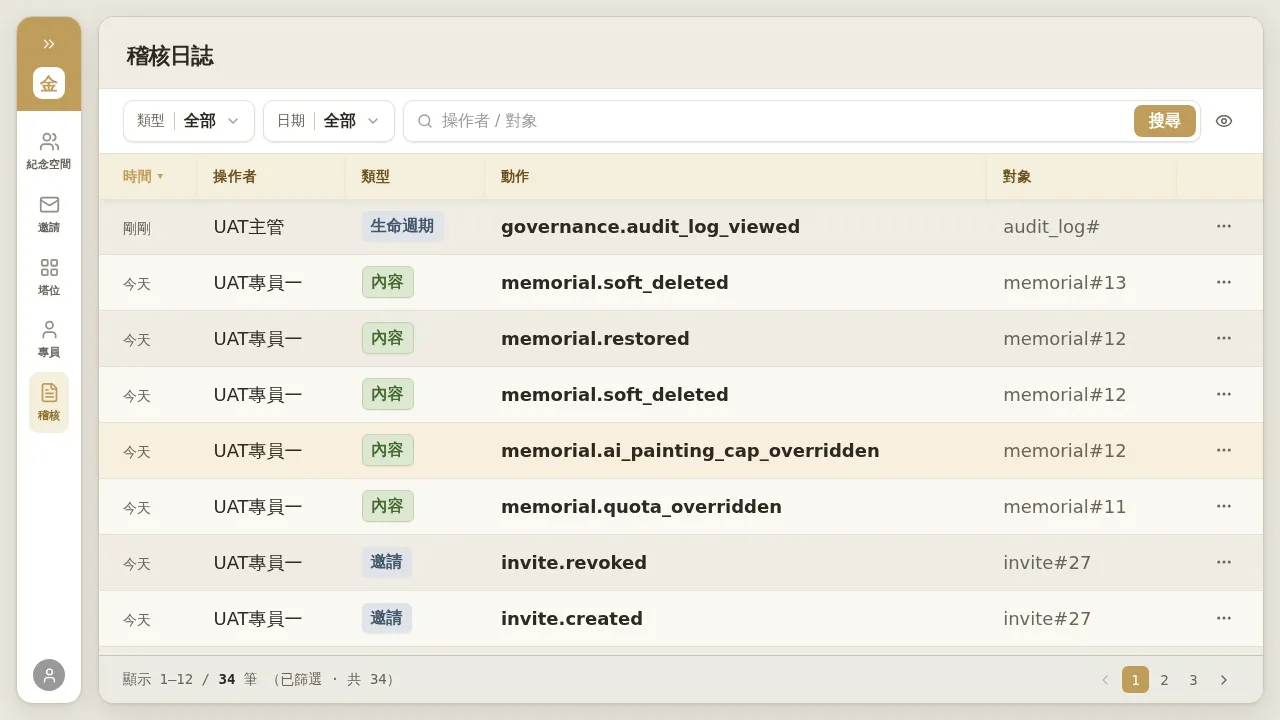 Figure 5-1: A Manager’s “Audit Log”. Columns are time / operator / type / action / target; the bottom shows the count and pagination. The scope is limited to themselves and their Account Managers.
Notes
- Content-type events (family members editing within a memorial space) record only metadata (who, when, what kind of action, on which target), and do not show the actual content before and after editing — this is the privacy boundary that keeps family content invisible to the business side.
- The audit scope is based on the “operator”: for memorial spaces of your Account Managers, operations a Tenant Admin performs on them (such as a hard delete or a change of responsible Account Manager) will not appear in your audit view; viewing the tenant-wide trail requires Tenant Admin privileges.
- Each time the audit page is opened, that view itself is also recorded as an event, which is normal.